
Git 使用
常见配置
初始化配置
bash
git config --global user.name <your name>
git config --global user.email <your email>
生成 SSH Key
bash
ssh-keygen -C <your email>配置多个远程仓库
方式一
bash
git remote add origin [url1]
git remote add other-remote [url2]
TIPS: 这样推送时需要推送两次
方式二
bash
git remote add origin [url1]
git remote set-url --add origin [url2]
TIPS: 这样只需推送一次
设置代理
HTTP(S)代理
bash
# 设置代理
git config --global http.proxy http://127.0.0.1:1080
# socks5 换个协议就可以了
# git config --global http.proxy socks5://127.0.0.1:8080
git config --global https.proxy https://127.0.0.1:1080
# 取消代理
git config --global --unset http.proxy
git config --global --unset https.proxy
SSH 代理
在~/.ssh 目录下新建一个名为 config 的配置文件, 输入如下配置
Host github.com
    User git
    ProxyCommand connect -S 127.0.0.1:1090 %h %p
-S 代表的使用 socks 协议 Linux 下可能没有
connect命令, 按如下步骤安装:
- 下载 connect 源码, 下载地址
- 使用 gcc 编译
gcc connect.c -o connect, 没有 gcc 自行安装- 编译完成后将软件放置到/bin 目录下即可
Git 常用命令
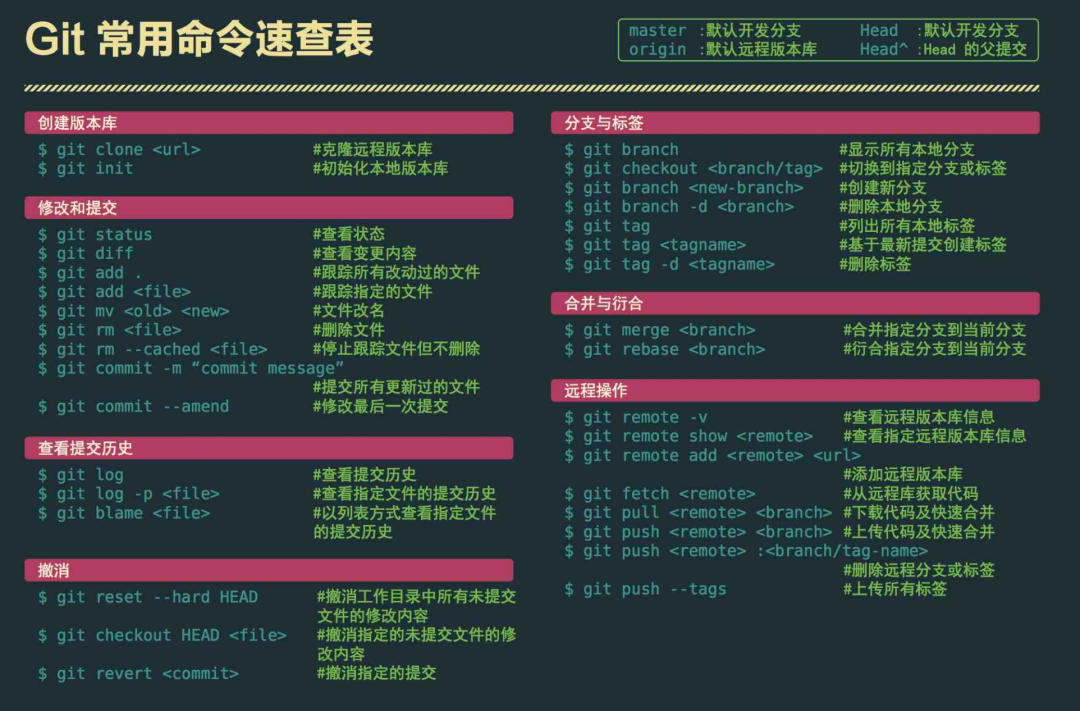
点击预览
gitignore 语法
- 空行或是以
#开头的行即注释行将被忽略。 - 可以在前面添加正斜杠
/来避免递归。 - 可以在后面添加正斜杠
/来忽略文件夹,例如build/即忽略 build 文件夹。 - 可以使用
!来否定忽略,即比如在前面用了*.apk,然后使用!a.apk,则这个 a.apk 不会被忽略。 *用来匹配零个或多个字符,如*.[oa]忽略所有以".o"或".a"结尾,*~忽略所有以~结尾的文件(这种文件通常被许多编辑器标记为临时文件);[]用来匹配括号内的任一字符,如[abc],也可以在括号内加连接符,如[0-9]匹配 0 至 9 的数;?用来匹配单个字符。
修改历史提交信息
使用命令git rebase -i HEAD~n 来修改历史提交信息,n表示要修改前 n 次所有的提交,也就是你要修改多少条提交记录。比如,需要修改从现在到30条范围内的提交记录,所以可以使用 git rebase -i HEAD~30。-i中的 i 是 interactive,交互的意思。如果需要从根提交开始修改, 则使用git rebase -i --root 来进行。
执行命令后会弹出文本编辑器
pick ac0fcc6 add file2
pick a0cbfbe add file3
pick 16ee6eb add file4

# Rebase d57f11f..16ee6eb onto d57f11f (3 command(s))
#
# Commands:
# p, pick = use commit
# r, reword = use commit, but edit the commit message
# e, edit = use commit, but stop for amending
# s, squash = use commit, but meld into previous commit
# f, fixup = like "squash", but discard this commit's log message
# x, exec = run command (the rest of the line) using shell
通过列表找到,需要要修改的提交信息,根据提示,如上面的例子中,我需要修改第二行和第三行的提交信息,那我们就可以将第二行和第三行的 pick 改成 edit 或 e,保存退出。保存上面的修改并退出后,git 会依次执行上面的操作,当操作为 pick 时,直接 commit。当操作为 edit 时,会中断,并提示以下信息:
You can amend the commit now, with

    git commit --amend

Once you are satisfied with your changes, run

    git rebase --continue
这里的意思是说,可以使用 git commit --amend 来修改此次提交,修改以后,觉得满意了,执行 git rebase --continue 继续剩下的流程。
如果要修改提交者信息,光用 git commit --amend 是不够的,我们要使用 git commit --amend --author "xw <aa.hbl@gmail.com>" 这样的操作,这一点是修改提交者信息的关键所在。
使用上面的命令成功修改此次提交的提交者信息后,一定要记得执行 git rebase --continue 继续